
Cloud9 Login With Your Australian Mobile Number
Cloud9 does not want your email address at the door. Its sign-in card asks for a mobile number written the international way — or a username, if you set one — plus a password of six to twenty characters. That is the whole gate, and it explains why so many first attempts bounce.
Almost nothing ranking for this search has opened the form. So here it is, captured in August 2026.
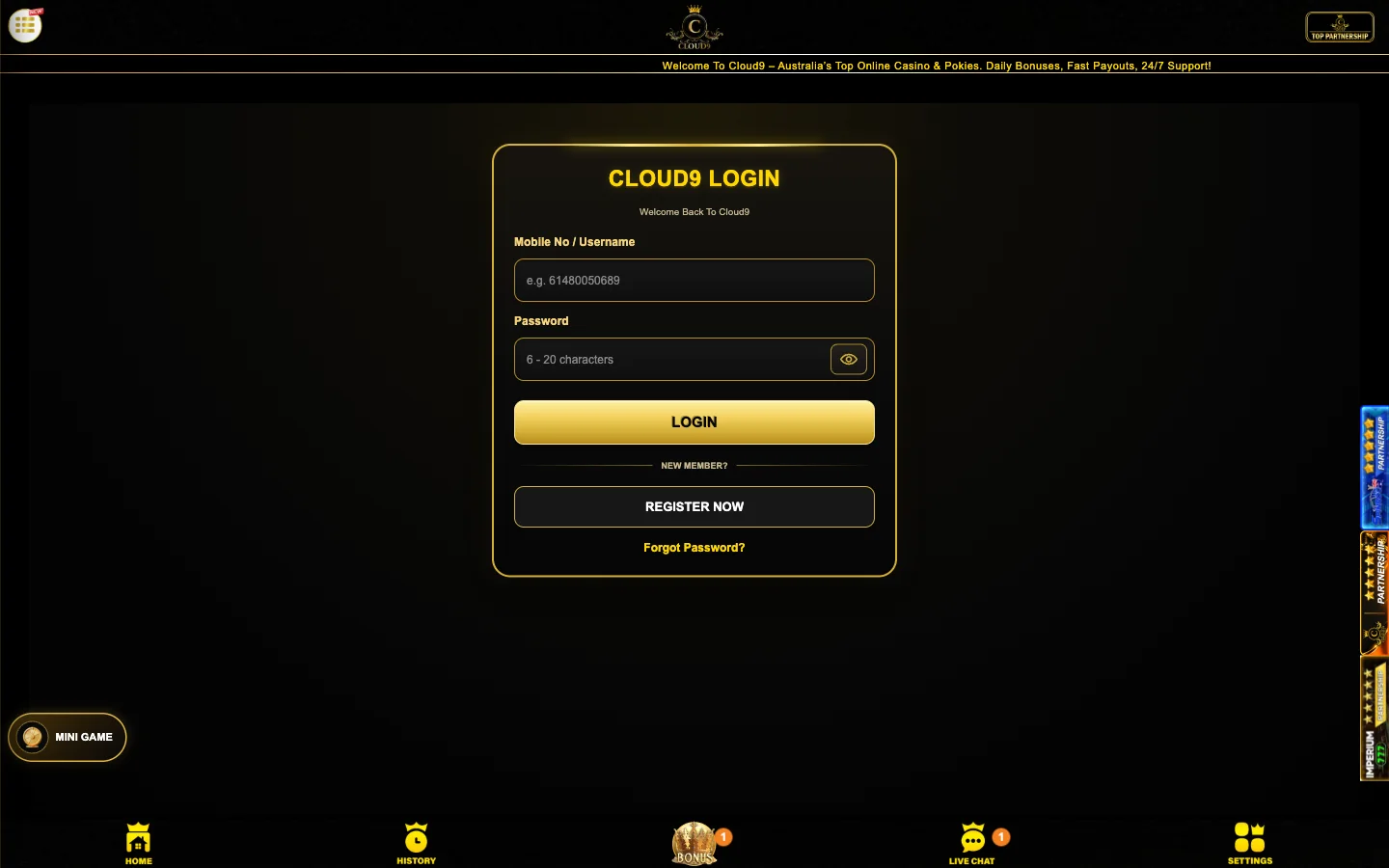
The Cloud9 Sign-In Form, Field by Field
Four controls sit on that card, and only two are boxes you type into.
| Field | What Cloud9 accepts | The trap |
|---|---|---|
| Mobile No / Username | An Australian mobile in international form: 61, then your number with the leading zero taken off. Cloud9's own placeholder spells it as 61480050689. A username works here too, if you set one at sign-up. | Typing 0480050689 the way you'd rattle it off out loud. The zero goes, 61 takes its place, no spaces or plus sign. |
| Password | Between 6 and 20 characters. The field wears that range as its label, and the eye icon on the right reveals what you've typed before you commit. | Generators that default to 24 or 32 characters. Input stops at twenty with no warning, so what you saved elsewhere may not match. |
| Forgot Password? | A text link under the button pair, opening recovery against the mobile number on the account, not your email. | No use to you if that handset is gone. Sort the number out before you need this link. |
| REGISTER NOW | The second button, under a NEW MEMBER? divider. It swaps the card over to the sign-up form. | Pressing it when an account already exists on your number. A duplicate is the quickest way to void a bonus. |
Eleven digits, every time. 0412 345 678 becomes 61412345678. Ten digits means you kept the zero; twelve means you added something Cloud9 doesn't want.
New here rather than returning? The registration form is walked through on the sign-up page.
Signing In to Cloud9 Step by Step
Under a minute, assuming the number is stored correctly and your thumb behaves.
- Open Cloud9 in your browser and press LOGIN in the top bar. On a phone it sits behind the menu icon.
- In the Mobile No / Username box, type 61 followed by your mobile with the leading zero removed, no spaces. A username goes in the same box if you set one.
- Fill the password box. Cloud9 holds it to six to twenty characters, and the eye icon at the right edge reveals what you typed.
- Press the gold LOGIN button. Cloud9 may text a one-time code to the number on the account, so keep the handset beside you.
- You land in the Cloud9 lobby, SLOT and FISHING sitting at the top of the category list. Nothing forces a deposit to get this far.
That last line matters. Sign in, look along the shelves, sign out again — no funding required. What sits inside those categories is broken down on the pokies page.
Why a Cloud9 Login Fails and How to Fix It
Sign-in errors here are rarely mysterious. Eight cover nearly everything, and one of them is not a fault at all.
| What you see | The likely cause | What to do |
|---|---|---|
| Credentials rejected on the first attempt of the day | The number went in with its leading zero. Cloud9 holds eleven digits and you offered ten. | Clear the box, type 61, then the rest without the zero. Check it against the placeholder in the field. |
| The password won't take, or the button does nothing | Your password falls outside the six to twenty character window Cloud9 enforces. | Count the characters. Under six needs padding, over twenty gets cut. Reset to something inside the range. |
| Password looks right on screen but is refused | Caps lock on a desktop keyboard, or a password manager quietly filling a value you changed months ago. | Tap the eye icon and read what is actually in the box. Delete the saved entry and type it by hand. |
| The one-time SMS code never arrives | Carrier filtering of international sender IDs, a number ported to a new provider, or no reception where you are standing. | Move somewhere with bars, check your blocked senders, then request one fresh code and wait. Firing off five trips a cooldown. |
| Signed out halfway through a session | The session token expired, the device hopped from wi-fi to mobile data, private browsing wiped storage, or the account signed in elsewhere. | Sign in again and pick up where you were. Any resolved round lives on the server, not in your tab. |
| Nothing loads on home broadband, but it loads on mobile data | Your fixed-line connection is not resolving the address while the mobile network does. The casino is up. | Confirm on mobile data with wi-fi off, then reach the backup address Cloud9 lists in its own menu — the next section. |
| “Account not found” on a username you are sure about | No username was ever set, so the account answers only to the mobile number. | Switch to the 61-format number. Set a username afterwards if typing digits every time annoys you. |
| Account locked, and chat mentions self-exclusion | Nothing is broken. A self-exclusion was requested on this account and Cloud9 is doing what it was told. | Leave it locked. This row is not a bug and not something to work around — the block is the point of it. |
That last row deserves saying out loud. If you asked Cloud9 to shut you out, a lockout screen means the tool worked. Don't route around it with a second number. The limits, session timers and self-exclusion options are set out here.
The Cloud9 Backup Domain When the Main Address Won't Load
Tucked inside Cloud9's own menu is an entry labelled Backup Domain / Official Access Portal. Nobody else writing about this casino seems to have noticed it. Odd, because it is the most useful thing on the site the day the front door stops answering.
A mirror is a second web address serving the same platform. Same accounts, same balance, same cashier — a different name on the door. You sign in with the credentials you already hold.
Offshore casinos keep mirrors for reasons that have little to do with the player. Domains get caught in network-level filters, registrars suspend addresses over disputes, and DNS records go stale. Rather than lose everyone at once, the operator keeps a spare address warm and points at it from inside the site.
And a mirror address is trivially easy to fake.
The rule, and it has no exceptions: never type your Cloud9 password into an address you found in a search result, a text message or an email. A genuine backup domain is linked from inside your own logged-in Cloud9 session, where nobody but the operator can put it. Anything reaching you from outside that session is a stranger asking for your password.
So look it up while everything works. Sign in on a normal day, open the menu, find the backup entry and note the address down. Hunting for it for the first time while the main site is unreachable is exactly when a fake one gets clicked.
One more habit: if a mirror asks for something the main site never did — a card number at sign-in, say — close the tab and reach the main Cloud9 site another way.
Resetting a Forgotten Cloud9 Password
The “Forgot Password?” link starts a recovery that runs on your phone, not your inbox. Cloud9 identifies you by the mobile number the account was opened with, texts a verification code to it, and lets you set a replacement once the code checks out. Keep the new one inside six to twenty characters.
Live chat is staffed around the clock and useful for part of this. An agent can confirm whether an account exists on a number, say whether it is locked, and escalate when a code refuses to arrive.
What chat will not do is read your password back to you. Nobody at Cloud9 can, and any message claiming otherwise is not from Cloud9. An agent also cannot swap the registered mobile on a whim — that number is the thing proving you are you.
Which is where resets stall. If your number was ported, recycled by a carrier, or sat in a handset you no longer own, the code goes somewhere you cannot reach. Expect a longer conversation with support, and update the number on the account the week you change it.
Keeping a Cloud9 Account Secure
One person, one account. Cloud9 restricts its welcome bonus to one per player, per household and per payment method, so a shared login, or a second account under the same roof, lands right on top of that condition.
- Skip cafe and airport wi-fi. Your phone's own data is a private connection and a free one.
- Let the browser's password manager hold the password, but keep the browser behind a device passcode. A saved credential on an unlocked laptop is not a secret.
- Sign out on any device that isn't yours instead of closing the tab and assuming the session died with it.
- Treat an unexpected SMS code as a warning — somebody has your number and is trying your password.
Worth knowing about timing: Cloud9 asks for identity documents before it pays money out, not when you walk in. The document list is on the registration page, and the withdrawals page covers where verification bites.
Cloud9 Login Questions Australians Ask
A mobile number, or a username. The box reads Mobile No / Username and its placeholder is an Australian mobile in international form. Your email is for contact, not for the door.
Drop the leading zero and put 61 in its place, with no spaces and no plus sign. So 0480 050 689 becomes 61480050689, which is the exact placeholder Cloud9 prints inside the field.
Six characters at the short end, twenty at the long end. The field wears that range as its own label. Generators that default to 24 characters get quietly truncated.
Press Forgot Password? under the login button. Recovery runs on the mobile number registered to the account, so you need that handset. Pick a replacement inside the six to twenty character range.
Sessions expire on their own, and they drop when a device hops from wi-fi to mobile data, when private browsing clears storage, or when the account signs in somewhere else.
Test it on mobile data with wi-fi switched off. If it loads there and nowhere else, the casino is fine and your own connection is refusing to resolve the address.
A menu entry Cloud9 labels Backup Domain / Official Access Portal. It is a second address serving the same accounts and the same balance. Take the link from inside the site, never from a search result.
Yes, if you set one. The field takes either, which is why Cloud9 labels it Mobile No / Username. Password reset still works from your mobile number.
No. The number and the password are all it wants. Identity checks belong to the withdrawal stage, so a document request arriving at sign-in deserves a hard look before you send anything.
Poor idea. Cloud9 caps its welcome bonus at one per player, per household and per payment method — exactly where a shared login or a second account under one roof lands.
One account, one sign-in card. The same credentials open the pokies on a phone, a tablet or a desktop browser, with no separate mobile registration and no download in the way.
Mobile number in 61 format, a password between six and twenty characters, and you're in. Set your limit before you fund anything.
Open Cloud9 and sign in